
User settings (Admin)
You can access the data room settings by clicking on the gear wheel symbol next to your data room name. The changes made here affect the entire data room and all users.
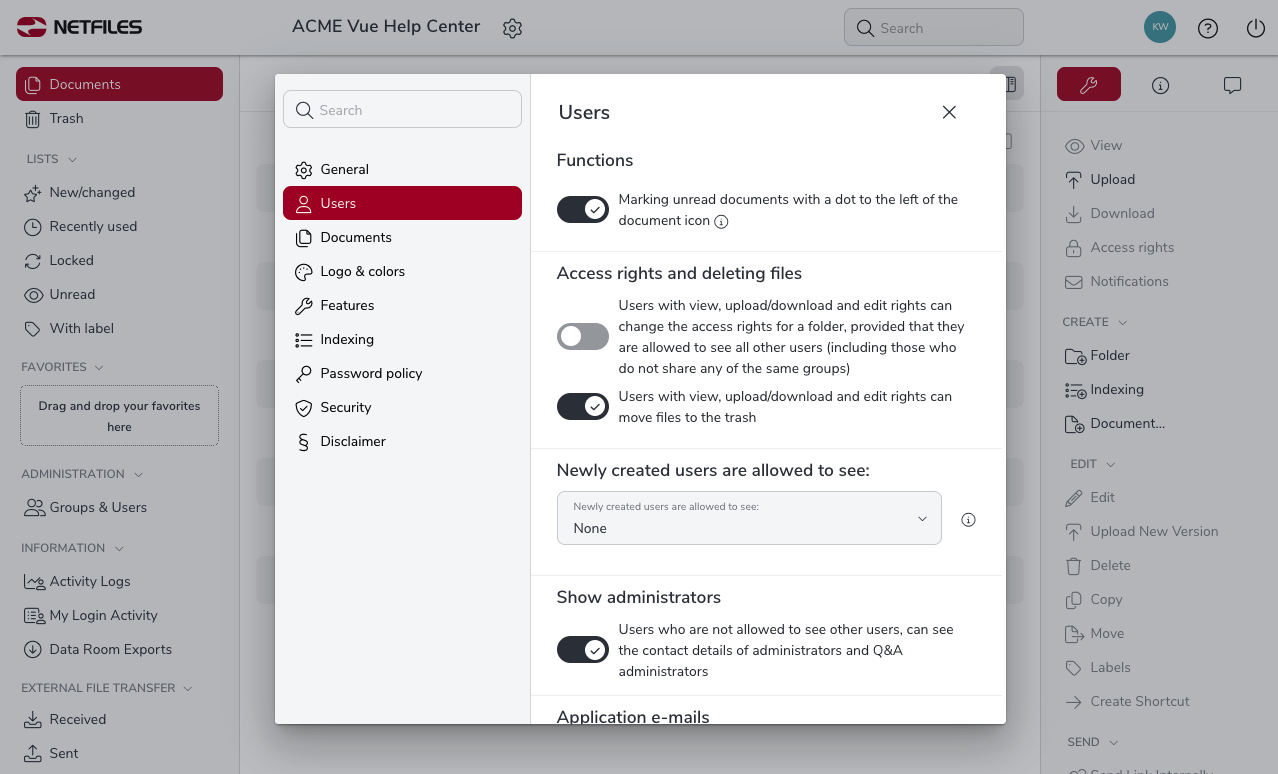
Here you will find the options for creating users and their rights. The options set here apply to all users in the data room.
Functions
Marking unread documents with a dot to the left of the document icon.
Access rights and deleting files
- Users with “View, upload/download and edit” rights can change the access rights for folders, provided that they are allowed to see all other users (including those who do not share any of the same groups).
- Users with “View, upload/download and edit” rights can move files to the trash.
Newly created users are allowed to see:
Default setting for new user creation. Newly created users may see the following other users:
- None
- All users from shared groups
- All users from all groups
Show administrators
Users who are not allowed to see other users, can see the contact details of administrators and Q&A administrators.
Application e-mails
Users can send emails directly from the data room to other users and external parties.
- E-mails will be sent as “plain-text” format.
- The sender of e-mails (External File Transfer, Send Internal Link and User E-mail) always receives a copy of the e-mail
- Notification e-mail to info-address after invitation/access confirmation
Security/Functional Information
- Send netfiles security and functional information to all administrators
- Send netfiles security and functional information to the responsible administrator only
Invitation validity period
1, 7, 14, 30 or 90 days Invitation validity period. The default setting is 14 days.
Help and information
Shows users a window containing helpful introductory hints on netfiles when they first log in

